

Data center & hosting
Your servers, somewhere built for them.
Colocation for hardware you already own, or hosted virtual machines on customer-separated networks if you would rather not own it. Either way, every layer has one named owner, written down before anything is racked.
- ColocationHardware you own, racked and operated to one standard.
- Hosted virtual machinesCustomer-separated networks, sized from what the workload actually uses.
- Managed optionsOS management, monitoring, backup and disaster recovery, defined per engagement.
- Remote handsScheduled during business hours, with after-hours work by arrangement.
What this actually covers
The short version, before the detail.
The decision most people are making
Rarely “which data center”. It is whether to keep owning the hardware, and who operates it once it leaves your building. Colocation keeps the asset yours; a hosted virtual machine removes it entirely. The honest answer depends on what you already own and what your software is licensed against.
What changes on your worst day
An office closet has no redundant power, no equipment-grade fire suppression, no access record, and nobody on site at 3am. Moving the same hardware into a data center changes that risk profile without changing the hardware you already paid for. It does not, on its own, change whether your backups work.
Who owns each layer
Read it from the bottom up. The point of this page is that none of these rows is left implied.
- Your applicationsYou
-
- Line-of-business apps
- Databases
- File services
Yours, and the data inside them. Honed IT supports the platform underneath unless a particular engagement says otherwise.
- Operating systemOptional — per engagement
-
- Windows Server
- Linux
- Patching
- Hardening
- Monitoring agents
OS management is one of the managed options. Where it is in scope, patching runs inside an agreed maintenance window; where it is not, it stays with you or your own IT team. This is decided at scoping, not assumed.
- ComputeThis is the choice
-
- Your own hardware — colocation
- or a hosted virtual machine
The one line that separates the two options below. Everything above and below this row works the same way either way.
- Network & accessHoned IT
-
- Customer-separated networks
- Firewall policy
- Remote access
- Change approval
Hosted virtual machines sit on customer-separated networks. Access and change follow written rules rather than memory — the same principle the rest of the service runs on.
- FacilityData center
-
- Power
- Cooling
- Physical security
- Carrier connectivity
Provided by the data center. Honed IT coordinates with it and operates your infrastructure inside it. Specific facility details are not published, and no claim of facility ownership is made.
- Remote handsScheduled
-
- Scheduled work
- Reboots
- Media swap
- Escorted access
Remote hands are scheduled during business hours, with after-hours work by arrangement. It is a scheduled service, not an engineer waiting on site — worth knowing before you need it rather than afterwards.
Colocation, or a hosted virtual machine?
| Colocation — your hardware | Hosted virtual machine | |
|---|---|---|
| Who owns the hardware | You do. Honed IT racks it and operates the layers you ask it to. | You do not. You take capacity, not an asset. |
| Cost shape | You have already bought the hardware, or you are choosing to. | No hardware purchase for the hosted workload. |
| Refresh and warranty | Yours to plan. Hardware work is scheduled as remote hands. | Not your concern for the hosted workload. |
| Growing a workload | Buy, ship and install hardware. | Adjust the resource allocated to the machine. |
| Usually the better fit when | You already own hardware, or a licence or policy ties you to specific equipment. | You want the workload to exist without owning a box to run it on. |
Both can run side by side. A workload that must stay on specific hardware colocates; one that keeps changing shape goes on a virtual machine. Which split makes sense is part of the scoping conversation.
What a cabinet actually looks like
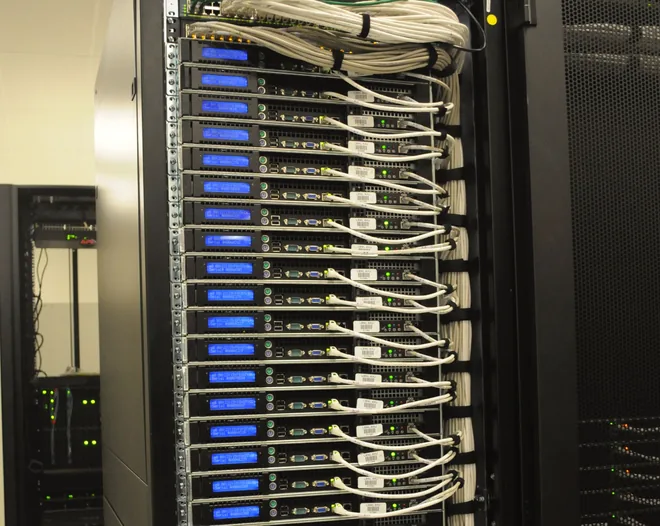
- 1UPatch panel
- 1USwitch
- 1UFirewall
- spare capacity
- 2UYour application serverYours
- 2UYour database serverYours
- 3UYour storageYours
- spare capacity
- 1USwitch
- spare capacity
- 3UPower distribution
Illustrative cabinet layout. Unit counts, equipment and cabinet size are set per engagement, and specific facility details are not published.
Reading the elevation
The highlighted units are yours — equipment you bought, racked alongside shared network and power infrastructure.
Everything above those units is a service decision rather than a hardware one: who patches the operating system, who holds firewall policy, who is called when something fails. Those are settled at scoping.
What the elevation cannot tell you is which facility it sits in. That is deliberate.
What can be managed on top
Hosting puts the hardware somewhere sensible. These are the things that keep it running well, and each one is defined per engagement rather than bundled by default.
Available as managed options
- OS management — patching and hardening inside an agreed maintenance window.
- Monitoring — alerting that reaches a person, not a dashboard nobody opens.
- Backup — designed around what you need to survive, and tested rather than assumed.
- Disaster recovery — recovery objectives agreed per system, because a file share and a core database rarely deserve the same answer.
- Network and firewall policy — written rules, with change approval.
Not included, and said plainly
- Honed IT does not own or operate a data center facility, and specific facility details are not published.
- Availability, response expectations and responsibilities are defined for your engagement rather than offered as a standard tier.
- Remote hands is scheduled, not continuous on-site presence.
- Hardware procurement is a separate piece of work, not part of hosting.
- Support for the people using these systems is managed or co-managed IT, which is a different conversation.
How an engagement starts
Nothing moves until the inventory is honest and the plan has a way back.
-
Scoping conversation
What you own, what it runs, who depends on it, and how much interruption the business can absorb.
-
Inventory and assessment
Hardware, warranty status, operating system versions, dependencies, and the current state of your backups. This stage frequently changes the plan, which is the point of doing it first.
-
Design
Rack layout or machine sizing, power and connectivity needs, network and firewall policy, access and change rules, and which managed options are in scope.
-
Migration plan
Sequence, the interruption window, the rollback position and who decides to use it. A move without a tested way back is a one-way door.
-
Move and commission
Staged, and verified at each step rather than all at the end.
-
Operate and review
The managed options you chose, plus capacity and refresh planning raised before it becomes urgent.
What makes the first conversation useful
None of this needs to be tidy. An honest “we are not sure” is a useful answer and a common one.
Worth knowing before we talk
- Roughly what hardware you have, and how old it is.
- What the critical applications are, and who supplies them.
- Whether any software is licensed against specific hardware.
- How much interruption each system can tolerate.
- What your backups currently do, and when a restore was last actually tested.
- Whether anyone needs physical access to the equipment, and how often.
A realistic example
A firm keeps two servers in a converted storeroom. Cooling fails over a long weekend; nothing is destroyed, but nobody notices until Tuesday. The question they bring is not “which data center” — it is “how do I stop this being my problem”. The inventory finds one server out of warranty and a backup job that has not completed successfully in weeks. The backup gets fixed before anything moves, because the backup is the rollback.
Illustrative scenario, written to show how the work is sequenced. Not a client account.
Questions people actually ask
Do you own the data center?
No. Honed IT coordinates with the facility and operates your infrastructure inside it. Specific facility details are not published, and no claim of facility ownership is made anywhere on this site.
What exactly is remote hands?
Physical work on your equipment carried out on request — a reboot, a media swap, reseating a component, escorting access. It is scheduled during business hours, with after-hours work by arrangement. It is not a continuous on-site presence, and the specifics are confirmed for your engagement.
How is a hosted virtual machine separated from other customers?
Hosted virtual machines run on customer-separated networks. The specific arrangement for your workload is confirmed as part of scoping, and is the kind of detail worth asking any hosting provider to put in writing.
Who looks after the operating system?
Whoever you agree should. OS management is one of the managed options; where it is in scope, patching and hardening run inside an agreed maintenance window. Where it is not, it stays with you or your own IT team. It is decided at scoping rather than left ambiguous.
Can you move servers I already own?
Yes — colocation of client-owned hardware is one of the two main options here. The move itself is run as a defined project with an inventory, an interruption window and a rollback position agreed in advance.
Are backups included?
Backup and disaster recovery are available as managed options and are defined per engagement, around what your business actually needs to recover and how quickly. They are not assumed to be in scope simply because something is hosted — that assumption is a common and expensive one.
Do I have to take managed IT as well?
No. Hosting can stand on its own, and an ongoing managed-services arrangement is not required to get started. If you later want the people-facing side covered too, managed or co-managed IT is a separate conversation.
What happens if I want to leave?
Colocated hardware is yours and leaves with you. For a hosted machine, an exit involves migrating the workload and the data to wherever you are going next. Either way it is worth agreeing the exit path at the start rather than at the end.
Tell us what you have, and where it lives now.
We will tell you honestly what moving it would involve — or whether it is worth moving at all. Hardware has to be physically handled, so this work is centred on New Jersey and the NYC metro area.
Please do not send passwords, patient information or other sensitive records in a first inquiry.